Quick Access

Open Prompt Bravo the moment you need it. Use the global keyboard shortcut or the menu bar icon to search, select, and copy a prompt in seconds.

Method 1: Global Keyboard Shortcut

Launch Prompt Bravo from anywhere on your Mac.

  1. The default shortcut is Command + Option + P. Then the Prompt Bravo App will be brought to the foreground.
  2. Copy and pasteinto ChatGPT, Claude, or any AI tool and run your command.

Method 2: Menu Bar Access

Keep Prompt Bravo one click away in your menu bar. Open, browse categories, and copy a prompt without switching contexts.
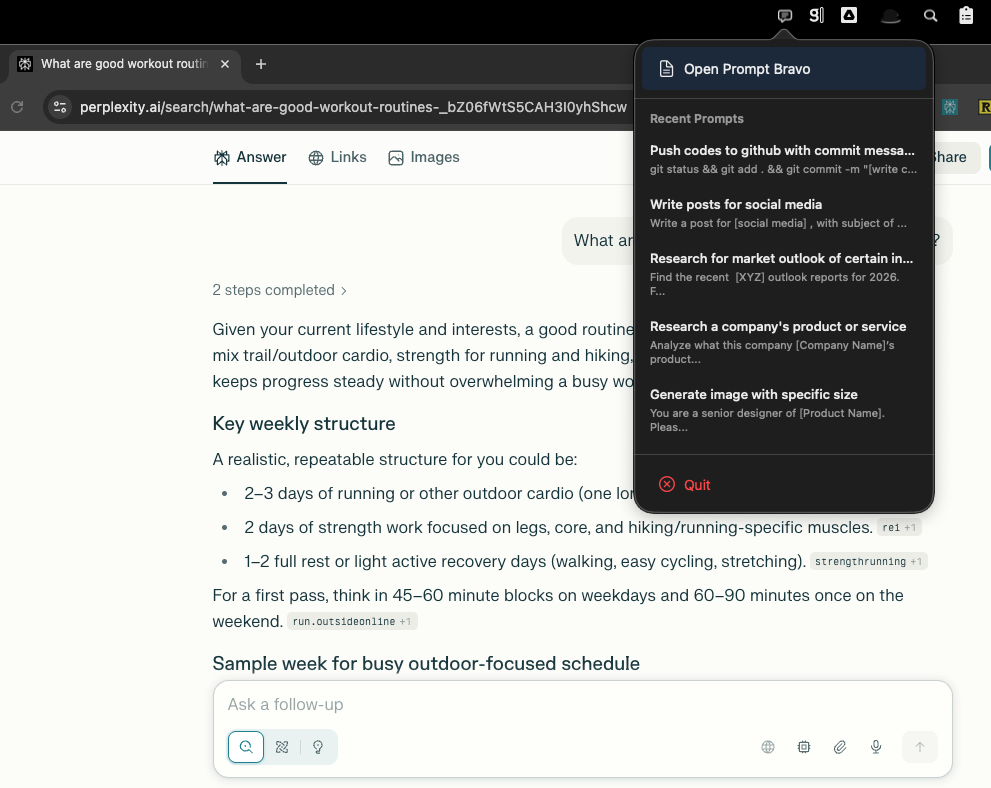
  1. Click the Prompt Bravo icon in the menu bar.
  2. The most recent 5 updated prompt will be displayed in the dropdown menu. You can select a prompt to copy and continue your work with no interruptions. But if there is any Smart Variable in the prompt, it will bring the Prompt Bravo App to the foreground to let you fill in the desired values of the variables.
    Prompt Bravo App Quick Access Menu Demo

Frequently Asked Questions

Need Help?

Can't find what you're looking for? Our support team is here to help.
Please click the "Contact Support" button below and fill in the form.
(The support email will be active soon!)
We will get back to you as soon as possible

Smart Clipboard to Manage AI Prompts

Save, organize, and access useful prompts instantly with Prompt Bravo